
BSidesNYC CTFd Writeup - Secret Map: Matroyshka?
It was the second part of "Secret Map: Scratching the surface" forensics challenge. The same map.jpg was provided.

Step 1: Metadata Analysis with exiftool
The initial step was to inspect the image's metadata for any hidden information. The exiftool utility is perfect for this, as it can read a wide variety of metadata tags.
Command:
└─$ exiftool map.jpg
Response & Analysis: The output from exiftool contained a non-standard Notes field, which immediately stood out.
Notes : flag{m47ry05hk4}
This first flag, m47ry05hk4, translates from leetspeak to "Matryoshka." This wasn't the final answer but a critical clue, indicating that another file or piece of data was nested inside the map.jpg container.
Step 2: File Structure Analysis with binwalk
With the "Matryoshka" clue, the next logical step was to analyze the file's binary structure to find where the nested file might be. binwalk is a tool specifically designed to scan for signatures of other files or executable code embedded within a single file.
Command:
└─$ binwalk map.jpg
Response & Analysis: The binwalk output confirmed our suspicions. It identified headers for TIFF image data at two different offsets within the JPEG file structure.
DECIMAL       HEXADECIMAL     DESCRIPTION
--------------------------------------------------------------------------------
0             0x0             JPEG image data, JFIF standard 1.01
30            0x1E            TIFF image data, big-endian, offset of first image directory: 8
218           0xDA            JPEG image data, JFIF standard 1.01
248           0xF8            TIFF image data, big-endian, offset of first image directory: 8
This result was definitive proof that at least one other image file was hidden inside the primary map.jpg file.
Step 3: Extracting the Hidden File with foremost
Now that we knew a file was embedded, we needed to extract it. This process is known as file carving. foremost is a forensic tool that recovers files by scanning for their unique headers and footers, making it ideal for this task.
Command: We directed foremost to use map.jpg as the input (-i) and to place any recovered files into a new directory called output (-o).
└─$ foremost -i map.jpg -o output
Response & Analysis: foremost processes the file and provides a summary of its findings.
Processing: map.jpg
|*|
After the command finishes, a new directory named output is created. Inside, foremost organizes the carved files into subdirectories based on their file type.
Step 4: Locating and Revealing the Final Flag
The final step was to navigate into the output directory and examine the carved files.
Commands: First, we changed our location to the directory containing the recovered JPEG files.
└─$ cd output/jpg
Next, we listed the contents of this directory to see what was extracted.
└─$ ls
0000000.jpg
Result & Analysis:
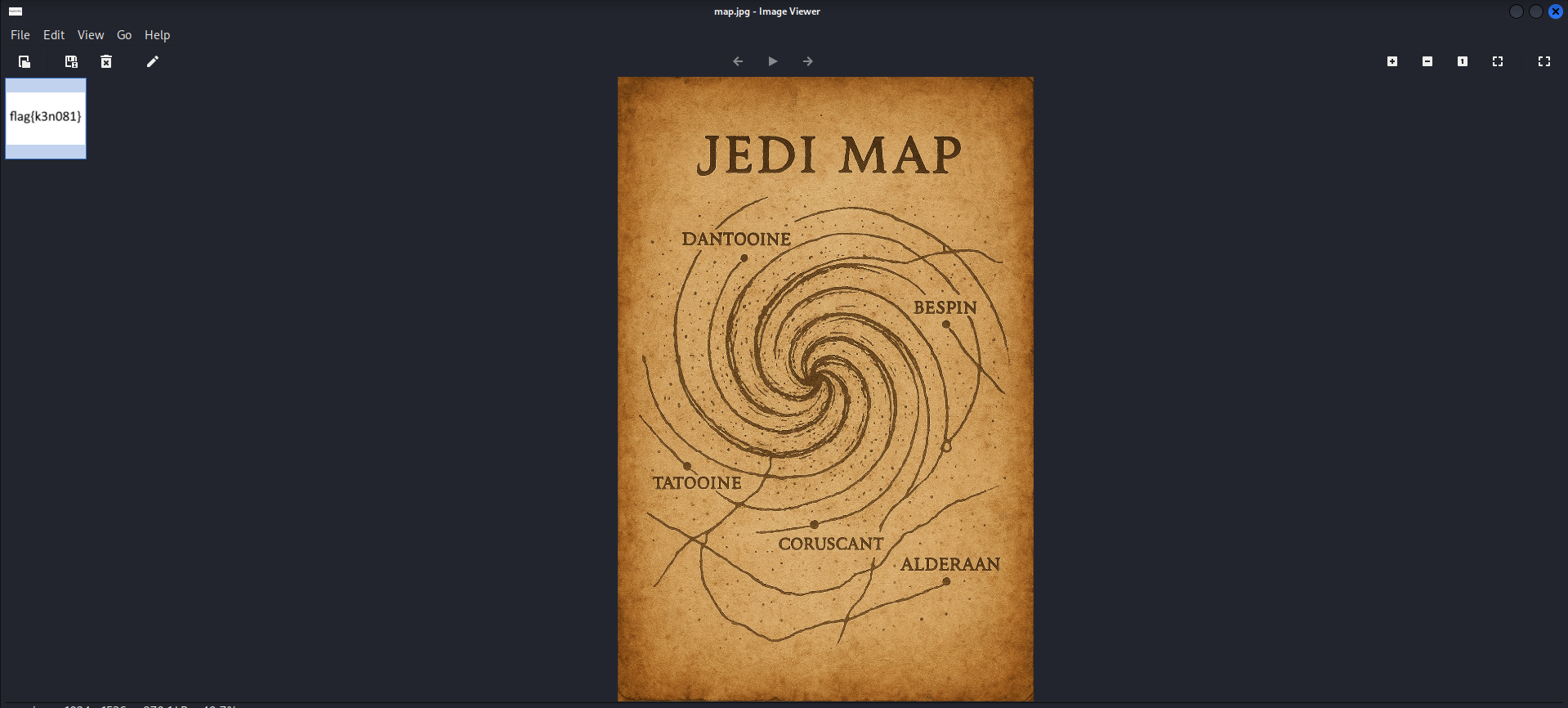
The flag is flag{k3n081}